
Menu Customize; Menu Icon - Page 273
2021 Honda Civic Hatchback Owners Manual
Table of Contents
Continued
271
uu
Audio System Basic Operation
u
Audio/Information Screen
Features
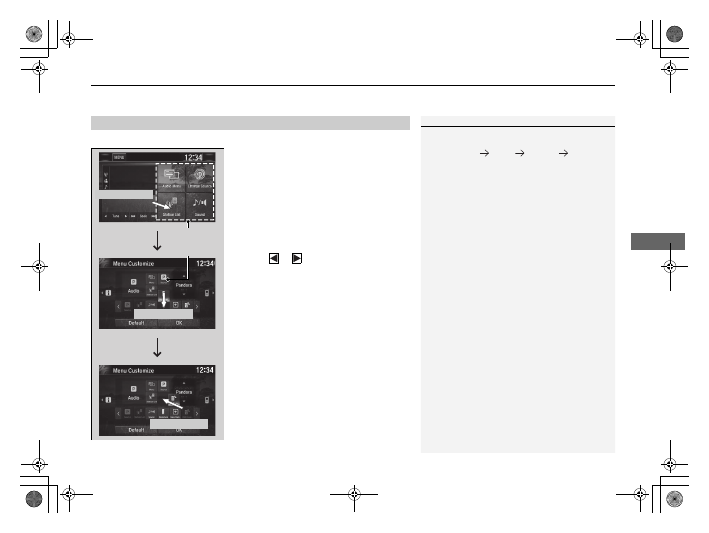
You can change menu icons on the right side of
Audio
,
Phone
, and
Info
screen.
1.
Select and hold menu icon.
2.
Select
or
icon,
then
Audio
,
Phone
,
or
Info
from
Menu Customize
.
3.
Select and hold the menu icon you want to
change, then drag and drop the icon to the
bottom.
4.
Select and hold the menu icon you want to
add, then drag and drop the icon to above.
5.
Select
OK
.
■
Menu Customize
1
You can also use the method below to change menu
icon:
Select
Settings
System
Home
tab
Menu Icon
Position
Select and hold
Menu Icons
To change
Menu Icon
To add
Drag and drop
Drag and drop
21 CIVIC 5D HUM-31TGG6400_01.book 271 ページ 2020年8月28日 金曜日 午後1時48分
Detailed Information for 2021 Honda Civic Hatchback Owners Manual
Lists of information found in 2021 Honda Civic Hatchback Owners Manual - Page 273
- 1. Select and hold menu icon.
- 2. Select or icon, then Audio , Phone , or Info from Menu Customize .
- 3. Select and hold the menu icon you want to change, then drag and drop the icon to the bottom.
- 4. Select and hold the menu icon you want to add, then drag and drop the icon to above.
- 5. Select OK .
Related Documents for 2021 Honda Civic Hatchback Owners Manual
 All trademarks are property of their respective owners. Tightrope
Interactive
All trademarks are property of their respective owners. Tightrope
Interactive