
Remote Touch.- Page 239
2022 Lexus iS300 Owners Manual
Table of Contents
Lexus 2022 IS300,IS350, IS500 Owner's Manual (OM53F48U)
9. For owners
Seat belt instructions for Canadian owners (in French)
Headlight aim instructions for Canadian owners (in French)
239
5-1. Remote Touch/Display
5
In
te
rio
r f
ea
tu
re
s
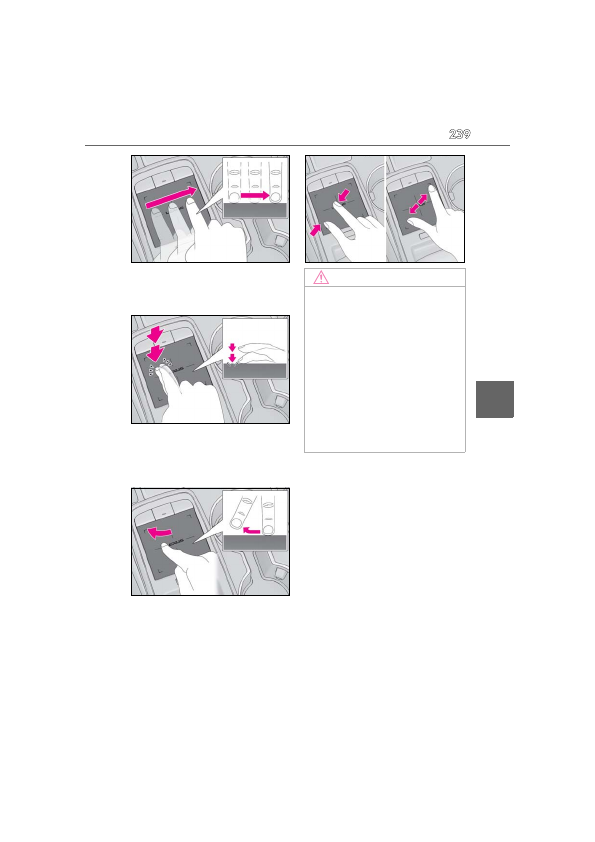
Double tap
Tap the touchpad twice, quickly. Select the
button on the screen.
Flick
Quick and short movement along the
touchpad with you finger. Move the list
screen.
Pinch in/Pinch out
Slide fingers toward each other or apart on
the touchpad. Change the scale of the
map.
NOTICE
■
To prevent damage to the Remote
Touch
Observe the following precautions. Fail-
ure to do so may cause damage to the
Remote Touch.
●
Do not allow food, liquid, stickers or lit
cigarettes to contact the Remote
Touch.
●
Do not subject the Remote Touch to
excessive pressure or strong impact.
●
Do not push the touchpad with a
strong force or use a sharp pointed
object to operate the pad.
Detailed Information for 2022 Lexus iS300 Owners Manual
Lists of information found in 2022 Lexus iS300 Owners Manual - Page 239
- 1. Remote Touch/Display 5 In te rio r f ea tu re s Double tap Tap the touchpad twice, quickly.
Related Documents for 2022 Lexus iS300 Owners Manual
 All trademarks are property of their respective owners. Tightrope
Interactive
All trademarks are property of their respective owners. Tightrope
Interactive