
Fuel consumption informa-- Page 82
2022 Lexus iS300 Owners Manual
Table of Contents
82
2-1. Instrument cluster
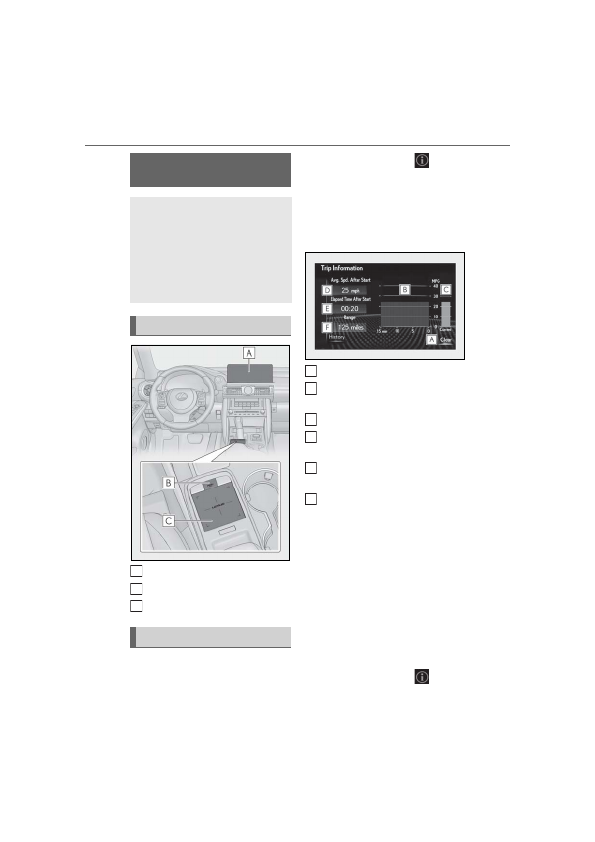
Center Display
“MENU” button
Touchpad
■
Trip information
Press the “MENU” button on the
Remote Touch, then select
on the
menu screen.
If a screen other than “Trip Information”
is displayed, select “Trip Information”.
This system can also be operated by
the touch screen.
Resetting the consumption data
Fuel consumption in the past 15
minutes
Current fuel consumption
Average vehicle speed since the
engine was started.
Elapsed time since the engine was
started.
Cruising range
Average fuel consumption for the past
15 minutes is divided by color into past
averages and averages attained since
the engine switch was last turned to
IGNITION ON mode. Use the dis-
played average fuel consumption as a
reference.
The image is an example only, and may
vary slightly from actual conditions.
■
History
Press the “MENU” button on the
Remote Touch, then select
on the
Fuel consumption informa-
tion
Fuel consumption information can
be displayed on the Center Display.
Vehicles with a navigation system
(10.3-inch display): The fuel con-
sumption information can be dis-
played and operated on the side
display.
System components
Consumption
A
B
C
A
B
C
D
E
F
Detailed Information for 2022 Lexus iS300 Owners Manual
Lists of information found in 2022 Lexus iS300 Owners Manual - Page 82
- 1. Instrument cluster Center Display “MENU” button Touchpad ■ Trip information Press the “MENU” button on the Remote Touch, then select on the menu screen.
Related Documents for 2022 Lexus iS300 Owners Manual
 All trademarks are property of their respective owners. Tightrope
Interactive
All trademarks are property of their respective owners. Tightrope
Interactive