
AWD/IS350/IS300 AWD/IS300)- Page 291
2022 Lexus iS300 Owners Manual
Table of Contents
291
6-3. Do-it-yourself maintenance
6
Mai
nte
na
nc
e a
nd
c
are
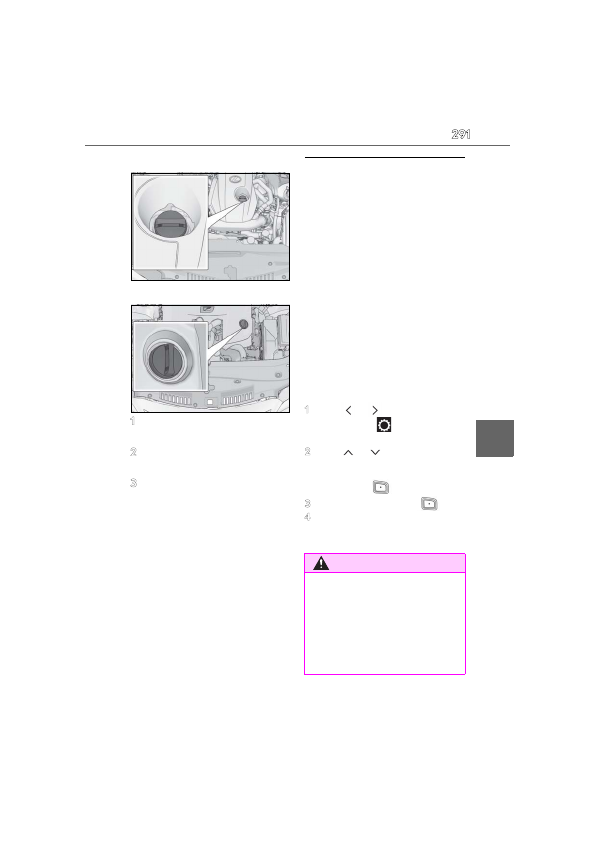
IS300
IS500
1
Remove the oil filler cap by turning
it counterclockwise.
2
Add engine oil slowly, checking the
dipstick.
3
Install the oil filler cap by turning it
clockwise.
■
Checking the oil type and prepar-
ing the item needed
Make sure to check the oil type and
prepare the items needed before add-
ing oil.
Engine oil selection
Oil quantity (Low
Full)
1.6 qt. (1.5 L, 1.3 Imp. qt.)
Item
Clean funnel
■
Engine oil consumption
A certain amount of engine oil will be con-
sumed while driving. In the following situa-
tions, oil consumption may increase, and
engine oil may need to be refilled in
between oil maintenance intervals.
●
When the engine is new, for example
directly after purchasing the vehicle or
after replacing the engine
●
If low quality oil or oil of an inappropriate
viscosity is used
●
When driving at high engine speeds or
with a heavy load, or when driving while
accelerating or decelerating frequently
●
When leaving the engine idling for a long
time, or when driving frequently through
heavy traffic
■
After changing the engine oil (IS350
AWD/IS350/IS300 AWD/IS300)
The engine oil maintenance data should be
reset. Perform the following procedures:
1
Press
or
of the meter control
switch to select
on the multi-infor-
mation display.
2
Press
or
of the meter control
switch, select the “Vehicle Settings”
then “Oil Maintenance”. (To confirm
setting, press
.)
3
Select the “Yes” and press
.
4
A message will be displayed on the
multi-information display when the
reset procedure has been completed.
WARNING
■
Used engine oil
●
Used engine oil contains potentially
harmful contaminants which may
cause skin disorders such as inflamma-
tion and skin cancer, so care should be
taken to avoid prolonged and
repeated contact. To remove used
engine oil from your skin, wash thor-
oughly with soap and water.
Detailed Information for 2022 Lexus iS300 Owners Manual
Lists of information found in 2022 Lexus iS300 Owners Manual - Page 291
- 3. Do-it-yourself maintenance 6 Mai nte na nc e a nd c are IS300 IS500 1 Remove the oil filler cap by turning it counterclockwise.
- 1.6 qt.
- 1.5 L, 1.
Related Documents for 2022 Lexus iS300 Owners Manual
 All trademarks are property of their respective owners. Tightrope
Interactive
All trademarks are property of their respective owners. Tightrope
Interactive