
Centering Active”- Page 181
2022 Lexus iS300 Owners Manual
Table of Contents
181
4-5. Using the driving support systems
4
Driving
informs the driver of the system operation
status.
Illuminated in white: LTA system is operat-
ing.
Illuminated in green: Steering wheel assis-
tance of the steering assist function or lane
centering function is operating.
Flashing in orange: Lane departure alert
function is operating.
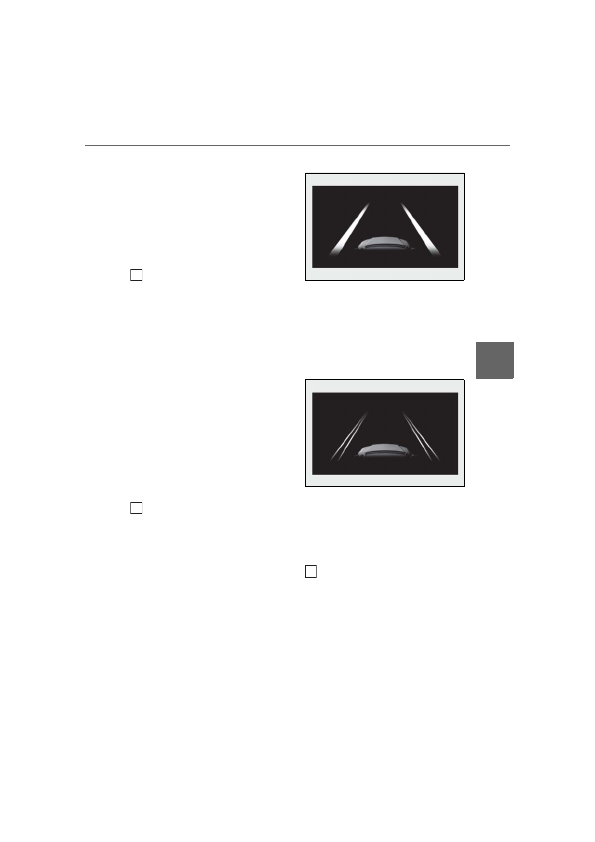
Operation display of steering
wheel operation support
Displayed when the multi-information dis-
play is switched to the driving support sys-
tem information display.
Indicates that steering wheel assistance of
the steering assist function or lane center-
ing function is operating.
Both outer sides of the lane are displayed:
Indicates that steering wheel assist of the
lane centering function is operating.
One outer side of the lane is displayed:
Indicates that steering wheel assist of the
steering assist function is operating.
Both outer sides of the lane are flashing:
Alerts the driver that their input is neces-
sary to stay in the center of the lane (lane
centering function).
Lane departure alert function dis-
play
Displayed when the multi-information dis-
play is switched to the driving support sys-
tem information display.
Inside of displayed lines is white
Indicates that the system is recognizing
white (yellow) lines or a course
*
. When
the vehicle departs from its lane, the
white line displayed on the side the
vehicle departs from flashes orange.
Inside of displayed lines is black
Indicates that the system is not able to
recognize white (yellow) lines or a
course
*
or is temporarily canceled.
*
: Boundary between asphalt and the side
of the road, such as grass, soil, or a curb
Follow-up cruising display
Displayed when the multi-information dis-
play is switched to the driving support sys-
tem information display.
Indicates that steering assist of the lane
centering function is operating by monitor-
ing the position of a preceding vehicle.
When the follow-up cruising display is dis-
played, if the preceding vehicle moves,
your vehicle may move in the same way.
B
C
D
Detailed Information for 2022 Lexus iS300 Owners Manual
Lists of information found in 2022 Lexus iS300 Owners Manual - Page 181
- 5. Using the driving support systems 4 Driving informs the driver of the system operation status.
Related Documents for 2022 Lexus iS300 Owners Manual
 All trademarks are property of their respective owners. Tightrope
Interactive
All trademarks are property of their respective owners. Tightrope
Interactive