
Perform - Page 265
2022 Lexus iS300 Owners Manual
Table of Contents
265
5-5. Using the other interior features
5
Interio
r fe
atures
ter button until the HomeLink
®
indica-
tor light changes from slowly flashing
orange to rapidly flashing green (roll-
ing code) or continuously lit green
(fixed code), then release the button.
Programming an entry gate (for
U.S.A. owners)/Programming a
device in the Canadian market
Press and release the remote control
transmitter button at 2 second inter-
vals, repeatedly, until the HomeLink
®
indicator light changes from slowly
flashing (orange) to rapidly flashing
(green) (rolling code) or continuously
lit (green) (fixed code).
4
Test the HomeLink
®
operation by
pressing the newly programmed
button and observing the indicator
light:
Indicator light illuminates: Program-
ming of a fixed code device has
completed. The garage door or
other device should operate when a
HomeLink
®
button is pressed and
released.
Indicator light flashes rapidly: The
garage door opener motor or other
device is equipped with a rolling
code. To complete programming,
firmly press and hold the Home-
Link
®
button for 2 seconds then
release it.
If the garage door or other device
does not operate, proceed to “Pro-
gramming a rolling code system”.
5
Repeat the steps above to program
another device for any of the
remaining HomeLink
®
buttons.
■
Programming a rolling code sys-
tem
2 or more people may be necessary to
complete rolling code programming.
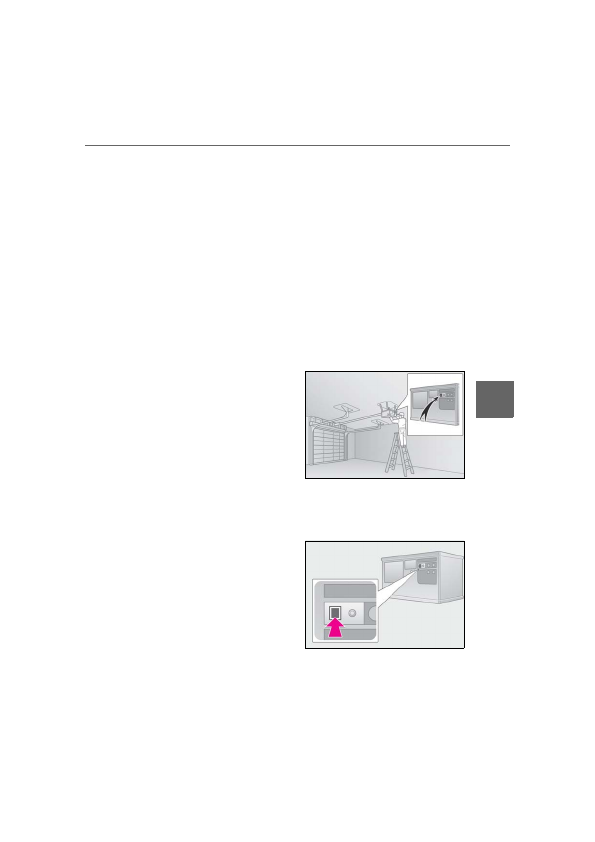
1
Locate the “Learn” or “Smart” but-
ton on the garage door opener
motor in the garage.
This button can usually be found where the
hanging antenna wire is attached to the
unit. The name and color of the button may
vary by manufacturer. Refer to the owner’s
manual supplied with the garage door
opener motor for details.
2
Press and release the “Learn” or
“Smart” button.
Perform
3
within 30 seconds after per-
forming
2
.
3
Press and hold the desired Home-
Link
®
button (inside the vehicle)
for 2 seconds and release it. Repeat
Detailed Information for 2022 Lexus iS300 Owners Manual
Lists of information found in 2022 Lexus iS300 Owners Manual - Page 265
- 5. Using the other interior features 5 Interio r fe atures ter button until the HomeLink ® indica- tor light changes from slowly flashing orange to rapidly flashing green (roll- ing code) or continuously lit green (fixed code), then release the button.
Related Documents for 2022 Lexus iS300 Owners Manual
 All trademarks are property of their respective owners. Tightrope
Interactive
All trademarks are property of their respective owners. Tightrope
Interactive