
Press - Page 218
2022 Lexus iS300 Owners Manual
Table of Contents
218
4-5. Using the driving support systems
Center Display (Panoramic view monitor)
(If equipped): “BRAKE!”
Multi-information display: “BRAKE!”
PKSB OFF indicator: Not illuminated
Buzzer: Short beep
Brake control is operating
The system determined that emergency
braking is necessary.
Center Display (Panoramic view monitor)
(If equipped): “BRAKE!”
Multi-information display: “BRAKE!”
PKSB OFF indicator: Not illuminated
Buzzer: Short beep
Vehicle stopped by system opera-
tion
The vehicle has been stopped by brake
control operation.
Center Display (Panoramic view monitor)
(If equipped): “Press Brake Pedal”
Multi-information display: “Switch to
Brake” (If the accelerator pedal is not
depressed, “Press Brake Pedal” will be dis-
played.)
PKSB OFF indicator: Illuminated
Buzzer: Short beep
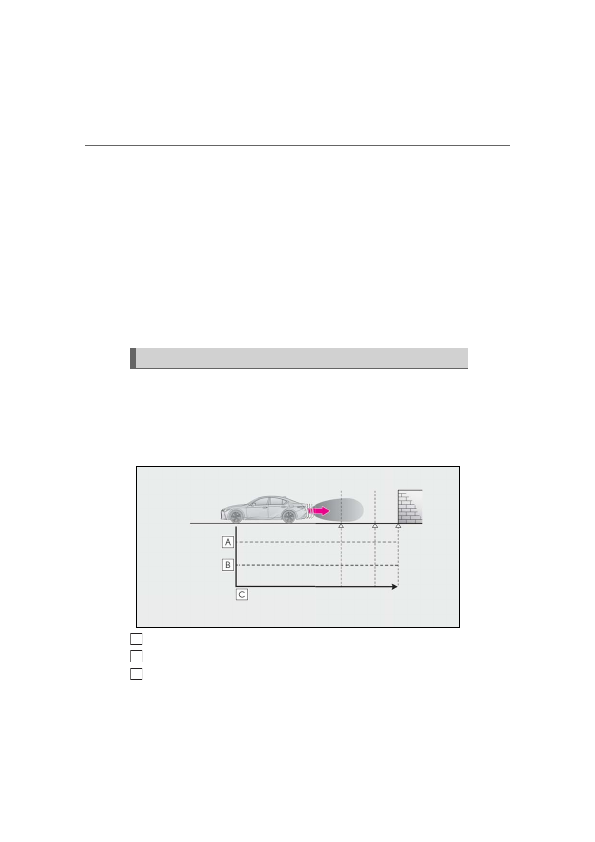
If the Parking Support Brake determines that a collision with a detected object is
possible, the engine output will be restricted to restrain any increase in the vehicle
speed. (Engine output restriction control: See figure 2.)
Additionally, if the accelerator pedal continues to be depressed, the brakes will be
applied automatically to reduce the vehicle speed. (Brake control: See figure 3.)
Figure 1 When the PKSB (Parking Support Brake) is disabled
Engine output
Braking force
Time
System overview
A
B
C
Detailed Information for 2022 Lexus iS300 Owners Manual
Lists of information found in 2022 Lexus iS300 Owners Manual - Page 218
- 5. Using the driving support systems Center Display (Panoramic view monitor) (If equipped): “BRAKE!” Multi-information display: “BRAKE!” PKSB OFF indicator: Not illuminated Buzzer: Short beep Brake control is operating The system determined that emergency braking is necessary.
- 2.) Additionally, if the accelerator pedal continues to be depressed, the brakes will be applied automatically to reduce the vehicle speed.
Related Documents for 2022 Lexus iS300 Owners Manual
 All trademarks are property of their respective owners. Tightrope
Interactive
All trademarks are property of their respective owners. Tightrope
Interactive