
Infotainment System; Entertainment Studio Settings; Remember Screen Power Status- Page 168
2022 Chevrolet suburban Owner Manual
Table of Contents
Chevrolet Tahoe/Suburban Owner Manual (GMNA-Localizing-U.S./Canada/
Mexico-15555985) - 2022 - CRC - 8/3/21
Infotainment System
167
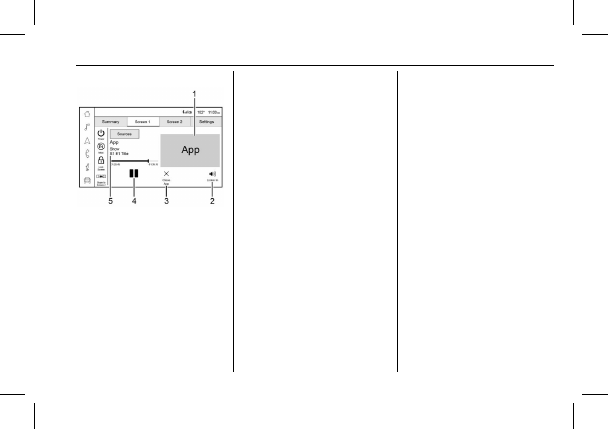
Screen Detail View with Content Playing
1. Art shown for current content playing.
2. Touch to have the audio play through
the vehicle
’
s interior speakers.
3. Touch to close an app on the rear
screen.
4. Touch to play or pause the currently
playing content.
5. Name and info of currently playing
content.
Entertainment Studio Settings
From the Entertainment Studio page, touch
Settings to access the settings menu.
The menu may contain the following:
Remember Screen Power Status
Select to have rear screens automatically
power on when the vehicle is started.
Rear Screen Voice-Over
Select to have Video Voice Over for the
individual rear screens.
Allowed Applications
Select to choose which applications are
visible.
Account
Select to show the vehicle data plan.
Reset Entertainment Studio
Select to reset the applications.
Entertainment Studio Terms of Use
Select to view the terms of use.
Privacy Statement
Select to view the Privacy statement.
RSI Troubleshooting
No power :
The ignition might not be on or
in ACC/ACCESSORY.
There is no sound from the headphones
with the indicator light on :
Make sure the
headphones have sufficient charge. Plug the
headphones to a USB-C port to charge.
Check to see if headphones are paired to the
screens. Make sure that you are listening in
to the correct screen by pressing the
channel select button.
If the steps above do not work, then unpair
the headphones from the RSI screens, turn
the headphones off, turn them back on and
attempt to pair them. See pairing
procedures for the Bluetooth headphone
previously in this section.
Video Distortion
Video distortion can occur when operating
cellular phones, scanners, CB radios, Global
Positioning Systems (GPS), two-way radios,
mobile faxes, or walkie talkies.
It might be necessary to turn off the video
player when operating one of these devices
in or near the vehicle.
Detailed Information for 2022 Chevrolet suburban Owner Manual
Lists of information found in 2022 Chevrolet suburban Owner Manual - Page 168
- 1. Art shown for current content playing.
- 2. Touch to have the audio play through the vehicle ’ s interior speakers.
- 3. Touch to close an app on the rear screen.
- 4. Touch to play or pause the currently playing content.
- 5. Name and info of currently playing content.
Related Documents for 2022 Chevrolet suburban Owner Manual
 All trademarks are property of their respective owners. Tightrope
Interactive
All trademarks are property of their respective owners. Tightrope
Interactive