
Supported flash drives and file types; Warning—Potential Damage: ; Supported flash drives and file types- Page 29
Lexmark C6160 Owners Manual
2
From the display, touch the document that you want to print.
If necessary, configure other print settings.
3
Send the print job.
To print another document, touch
USB Drive
.
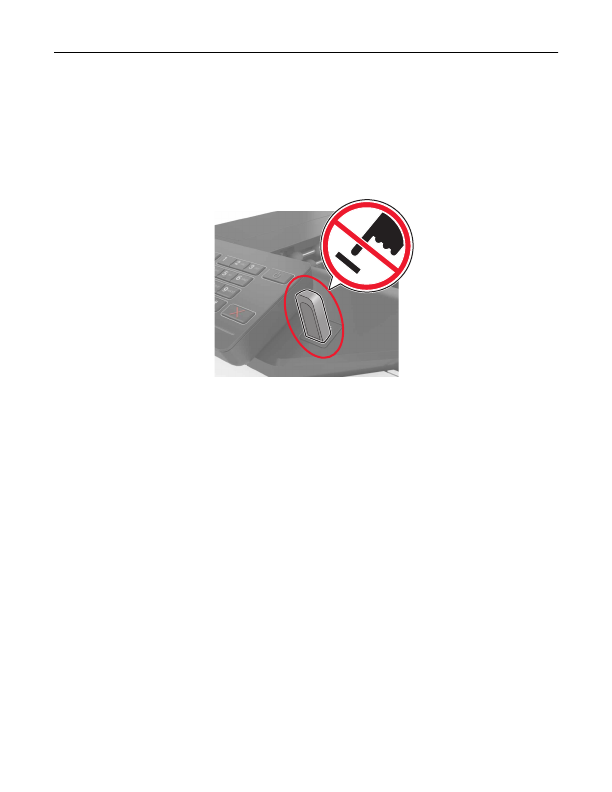
Warning—Potential Damage:
Do not touch the printer or the flash drive in the area shown while actively
printing, reading, or writing from the memory device. Loss of data or a malfunction can occur.
Supported flash drives and file types
Flash drives
•
Lexar JumpDrive S70 (16GB and 32GB)
•
SanDisk Cruzer (16GB and 32GB)
•
PNY Attaché (16GB and 32GB)
Notes:
–
The printer supports high
‑
speed USB flash drives with full
‑
speed standard.
–
USB flash drives must support the File Allocation Table (FAT) system.
File types
Documents:
•
.doc or .docx
•
.xls or .xlsx
•
.ppt or .pptx
•
•
.xps
Images:
•
.dcx
•
.gif
Printing
29
Detailed Information for Lexmark C6160 Owners Manual
Lists of information found in Lexmark C6160 Owners Manual - Page 29
- Lexar JumpDrive S70 (16GB and 32GB) • SanDisk Cruzer (16GB and 32GB) • PNY Attaché (16GB and 32GB) Notes: – The printer supports high ‑ speed USB flash drives with full ‑ speed standard.
- .
- .
- .
- .
- .
- .
- .
Related Documents for Lexmark C6160 Owners Manual
 All trademarks are property of their respective owners. Tightrope
Interactive
All trademarks are property of their respective owners. Tightrope
Interactive