
Printer configurations; CAUTION—TIPPING HAZARD: - Page 10
Lexmark C6160 Owners Manual
•
Keep the printer:
–
Clean, dry, and free of dust.
–
Away from stray staples and paper clips.
–
Away from the direct airflow of air conditioners, heaters, or ventilators.
–
Free from direct sunlight and humidity extremes.
•
Observe the recommended temperatures and avoid fluctuations:
Ambient temperature 10 to 32.2°C (50 to 90°F)
Storage temperature
-40 to 43.3°C (-40 to 110°F)
•
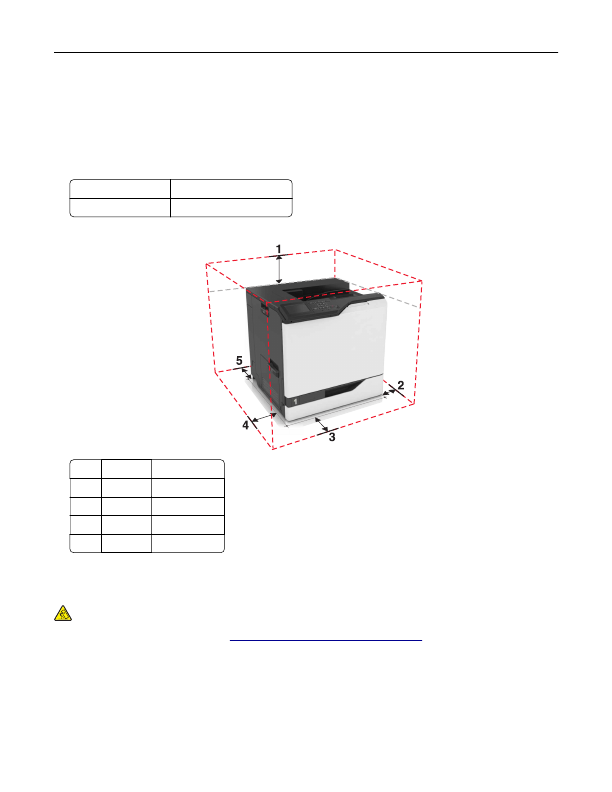
Allow the following recommended amount of space around the printer for proper ventilation:
1
Top
305 mm (12 in.)
2
Right side 152 mm (6 in.)
3
Front
381 mm (15 in.)
4
Left side
457 mm (18 in.)
5
Rear
203 mm (8 in.)
Printer configurations
CAUTION—TIPPING HAZARD:
Installing one or more options on your printer or MFP may require a
caster base, furniture, or other feature to prevent instability causing possible injury. For more information
on supported configurations, see
www.lexmark.com/multifunctionprinters
.
You can configure your printer by adding an optional 2200
‑
sheet tray or a combination of up to three optional
550
‑
sheet trays or envelope trays.
Learning about the printer
10
Detailed Information for Lexmark C6160 Owners Manual
Lists of information found in Lexmark C6160 Owners Manual - Page 10
- 32.2°C (50 to 90°F) Storage temperature -40 to 43.
- Keep the printer: – Clean, dry, and free of dust.
- Observe the recommended temperatures and avoid fluctuations: Ambient temperature 10 to 32.
- Allow the following recommended amount of space around the printer for proper ventilation: 1 Top 305 mm (12 in.
Related Documents for Lexmark C6160 Owners Manual
 All trademarks are property of their respective owners. Tightrope
Interactive
All trademarks are property of their respective owners. Tightrope
Interactive