
Printing from a mobile device using Mopria Print Service; Printing from a mobile device using AirPrint; Printing from a flash drive- Page 28
Lexmark C6160 Owners Manual
Printing from a mobile device using Mopria Print Service
Mopria® Print Service is a mobile printing solution for mobile devices running on Android version 4.4 or later. It
allows you to print directly to any Mopria
‑
certified printer.
Note:
Before printing, make sure that the Mopria Print Service is enabled.
1
From the home screen of your mobile device, launch a compatible application.
2
Tap
, and then select a printer.
3
Print the document.
Printing from a mobile device using AirPrint
AirPrint is a mobile printing solution that allows you to print directly from Apple devices to an AirPrint
‑
certified
printer.
Note:
This application is supported only in some Apple devices.
1
From the home screen of your mobile device, launch a compatible application.
2
Select an item to print, and then tap the share icon.
3
Tap
, and then select the printer.
4
Send the print job.
Printing from a flash drive
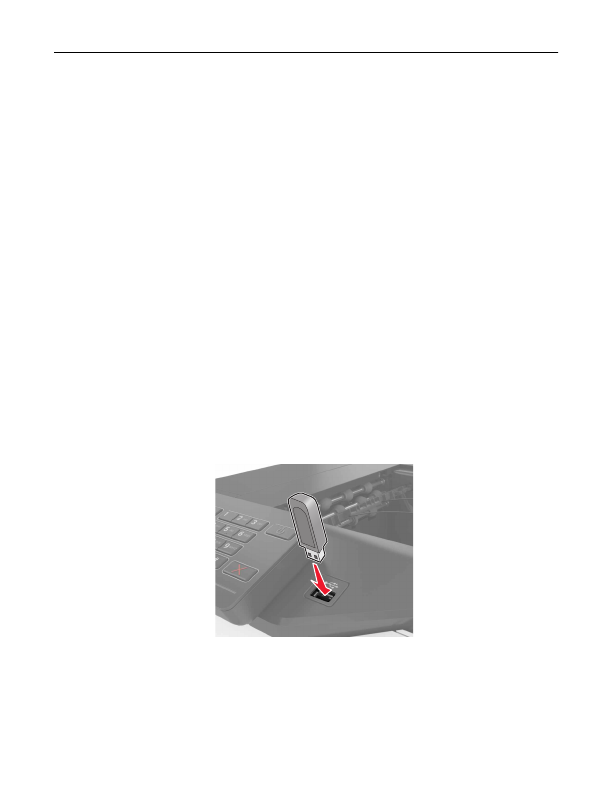
1
Insert a flash drive into the USB port.
Notes:
•
If you insert the flash drive when an error message appears, then the printer ignores the flash drive.
•
If you insert the flash drive while the printer is processing other print jobs, then
Busy
appears on the
display.
Printing
28
Detailed Information for Lexmark C6160 Owners Manual
Lists of information found in Lexmark C6160 Owners Manual - Page 28
- 4.4 or later.
- If you insert the flash drive when an error message appears, then the printer ignores the flash drive.
- If you insert the flash drive while the printer is processing other print jobs, then Busy appears on the display.
Related Documents for Lexmark C6160 Owners Manual
 All trademarks are property of their respective owners. Tightrope
Interactive
All trademarks are property of their respective owners. Tightrope
Interactive