
Linking trays; Note: ; Warning—Potential Damage: - Page 26
Lexmark C6160 Owners Manual
4
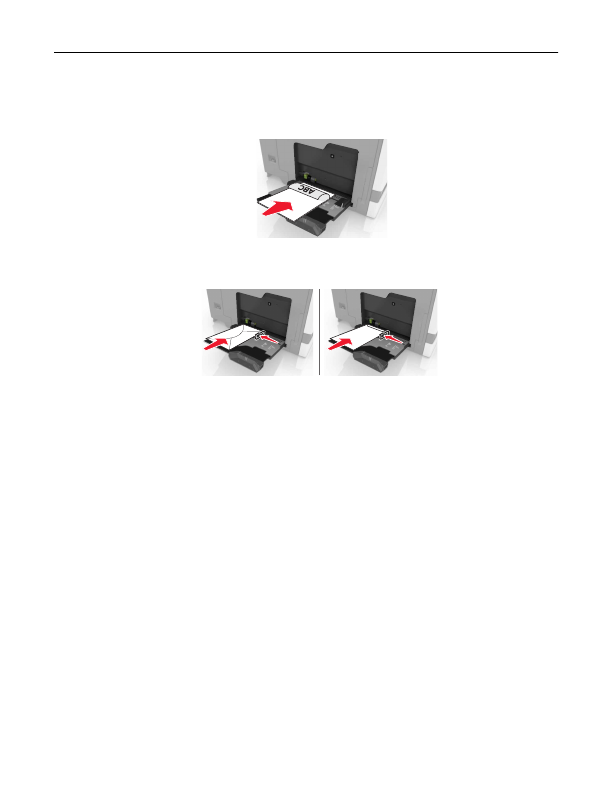
Load the paper.
•
Load paper, card stock, and transparencies with the printable side facedown and the top edge entering
the printer first.
•
Load envelopes with the flap side up and against the left side of the paper guide. Load European
envelopes with the flap side up and entering the printer first.
Warning—Potential Damage:
Do not use envelopes with stamps, clasps, snaps, windows, coated
linings, or self
‑
stick adhesives.
5
From the control panel, set the paper size and type to match the paper loaded in the tray.
Linking trays
1
Open a Web browser, and then type the printer IP address in the address field.
Notes:
•
View the printer IP address on the printer home screen. The IP address appears as four sets of
numbers separated by periods, such as 123.123.123.123.
•
If you are using a proxy server, then temporarily disable it to load the Web page correctly.
2
Click
Settings
>
Paper
.
3
Match the paper size and type for the trays you are linking.
Note:
To unlink trays, make sure that no trays have the same paper size or type.
4
Save the settings.
Note:
You can also change the paper size and type settings from the printer control panel.
Warning—Potential Damage:
The temperature of the fuser varies according to the specified paper type. To
avoid printing issues, match the paper type settings in the printer with the paper loaded in the tray.
Loading paper and specialty media
26
Detailed Information for Lexmark C6160 Owners Manual
Lists of information found in Lexmark C6160 Owners Manual - Page 26
- 23.123.
- 23.123.
- Load paper, card stock, and transparencies with the printable side facedown and the top edge entering the printer first.
- Load envelopes with the flap side up and against the left side of the paper guide.
- View the printer IP address on the printer home screen.
- If you are using a proxy server, then temporarily disable it to load the Web page correctly.
Related Documents for Lexmark C6160 Owners Manual
 All trademarks are property of their respective owners. Tightrope
Interactive
All trademarks are property of their respective owners. Tightrope
Interactive