
Upgrading and migrating; Hardware; Available internal options- Page 120
Lexmark C6160 Owners Manual
Upgrading and migrating
Hardware
Available internal options
•
Memory card
–
DDR3 DIMM
–
Flash memory
•
Fonts
–
Application cards
•
Forms and Bar Code
•
PRESCRIBE
•
IPDS
•
Lexmark Internal Solutions Port (ISP)
–
MarkNet
TM
N8360 (802.11 b/g/n/a wireless print server bundled with LEX
‑
M06
‑
001 Mobile Solutions
Module)
–
IEEE 1284
‑
B Parallel Card
–
RS
‑
232C Serial Card
Installing a memory card
CAUTION—SHOCK HAZARD:
To avoid the risk of electrical shock, if you are accessing the controller
board or installing optional hardware or memory devices sometime after setting up the printer, then turn
the printer off, and unplug the power cord from the electrical outlet before continuing. If you have any
other devices attached to the printer, then turn them off as well, and unplug any cables going into the
printer.
1
Turn off the printer, and then unplug the power cord from the electrical outlet.
2
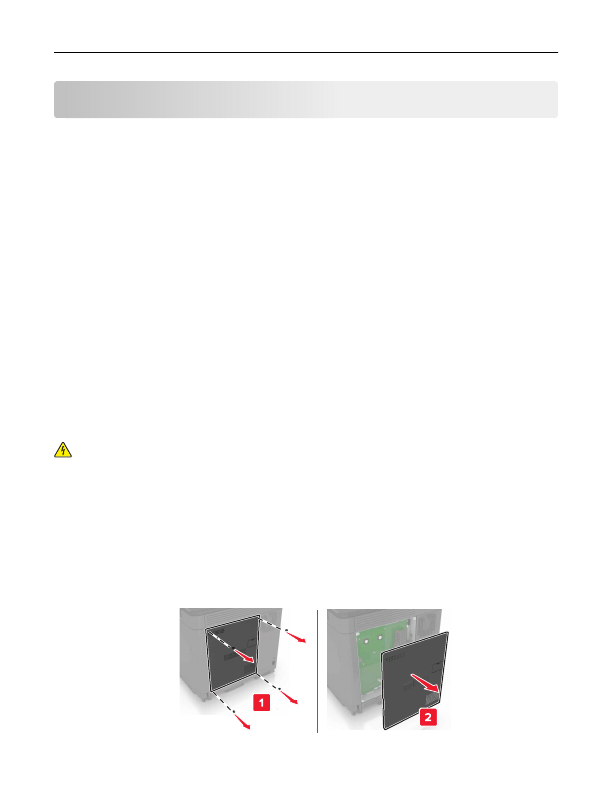
Using a flat
‑
head screwdriver, remove the controller board access cover.
Warning—Potential Damage:
Controller board electronic components are easily damaged by static
electricity. Touch a metal surface on the printer before touching any controller board components or
connectors.
Upgrading and migrating
120
Detailed Information for Lexmark C6160 Owners Manual
Lists of information found in Lexmark C6160 Owners Manual - Page 120
- 2.11 b/g/n/a wireless print server bundled with LEX ‑ M06 ‑ 001 Mobile Solutions Module) – IEEE 1284 ‑ B Parallel Card – RS ‑ 232C Serial Card Installing a memory card CAUTION—SHOCK HAZARD: To avoid the risk of electrical shock, if you are accessing the controller board or installing optional hardware or memory devices sometime after setting up the printer, then turn the printer off, and unplug the power cord from the electrical outlet before continuing.
- Memory card – DDR3 DIMM – Flash memory • Fonts – Application cards • Forms and Bar Code • PRESCRIBE • IPDS • Lexmark Internal Solutions Port (ISP) – MarkNet TM N8360 (802.
Related Documents for Lexmark C6160 Owners Manual
 All trademarks are property of their respective owners. Tightrope
Interactive
All trademarks are property of their respective owners. Tightrope
Interactive