
Clearing jams; Avoiding jams; Load paper properly- Page 71
Lexmark C6160 Owners Manual
Clearing jams
Avoiding jams
Load paper properly
•
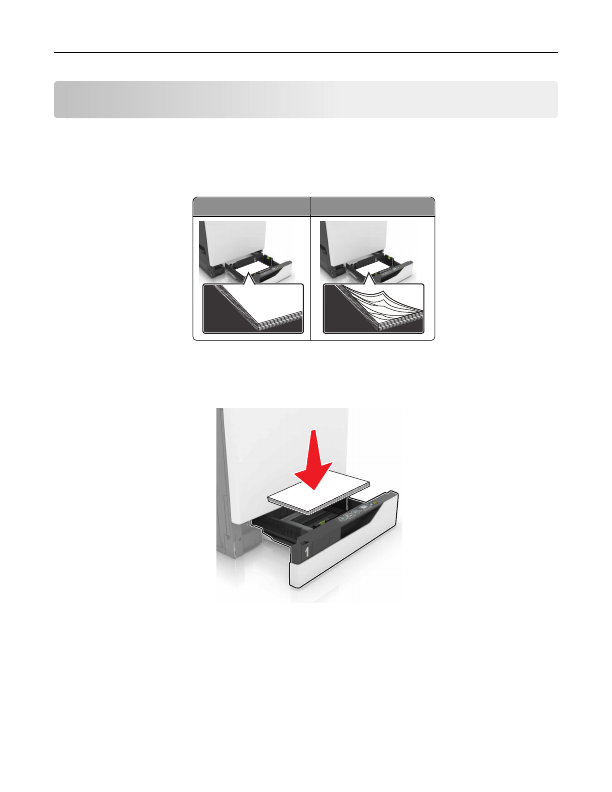
Make sure that the paper lies flat in the tray.
Correct loading of paper Incorrect loading of paper
•
Do not load or remove a tray while the printer is printing.
•
Do not load too much paper. Make sure that the stack height is below the maximum paper fill indicator.
•
Do not slide paper into the tray. Load paper as shown in the illustration.
•
Make sure that the paper guides are positioned correctly and are not pressing tightly against the paper or
envelopes.
•
Push the tray firmly into the printer after loading paper.
Use recommended paper
•
Use only recommended paper or specialty media.
•
Do not load paper that is wrinkled, creased, damp, bent, or curled.
Clearing jams
71
Detailed Information for Lexmark C6160 Owners Manual
Lists of information found in Lexmark C6160 Owners Manual - Page 71
- Make sure that the paper lies flat in the tray.
- Do not load or remove a tray while the printer is printing.
- Do not load too much paper.
- Do not slide paper into the tray.
- Make sure that the paper guides are positioned correctly and are not pressing tightly against the paper or envelopes.
- Push the tray firmly into the printer after loading paper.
- Use only recommended paper or specialty media.
- Do not load paper that is wrinkled, creased, damp, bent, or curled.
Related Documents for Lexmark C6160 Owners Manual
 All trademarks are property of their respective owners. Tightrope
Interactive
All trademarks are property of their respective owners. Tightrope
Interactive