
Note: ; These settings may also appear on the home screen- Page 14
Lexmark C6160 Owners Manual
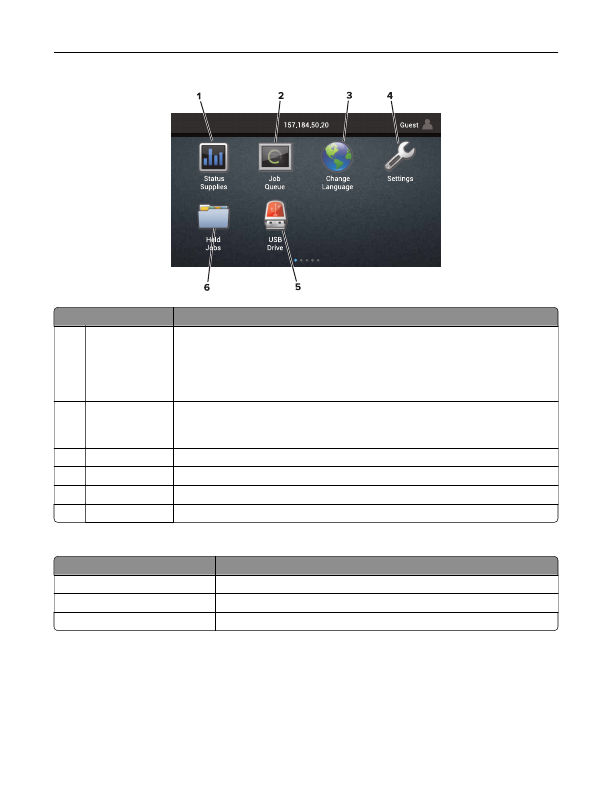
Touch
To
1
Status/Supplies
•
Show a printer warning or error message whenever the printer requires intervention
to continue processing.
•
View more information on the printer warning or message, and on how to clear it.
Note:
You can also access this setting by touching the top section of the home
screen.
2
Job Queue
Show all the current print jobs.
Note:
You can also access this setting by touching the top section of the home
screen.
3
Change Language Change the language on the printer display.
4
Settings
Access the printer menus.
5
USB Drive
View, select, or print photos and documents from a flash drive.
6
Held Jobs
Show all the current held print jobs.
These settings may also appear on the home screen
Touch
To
Bookmarks
Access bookmarks.
App Profiles
Access application profiles.
Lock Device
Prevent users from accessing any printer functions from the home screen.
Learning about the printer
14
Detailed Information for Lexmark C6160 Owners Manual
Lists of information found in Lexmark C6160 Owners Manual - Page 14
- Show a printer warning or error message whenever the printer requires intervention to continue processing.
- View more information on the printer warning or message, and on how to clear it.
Related Documents for Lexmark C6160 Owners Manual
 All trademarks are property of their respective owners. Tightrope
Interactive
All trademarks are property of their respective owners. Tightrope
Interactive