
Note: ; CAUTION—POTENTIAL INJURY: - Page 130
Lexmark C6160 Owners Manual
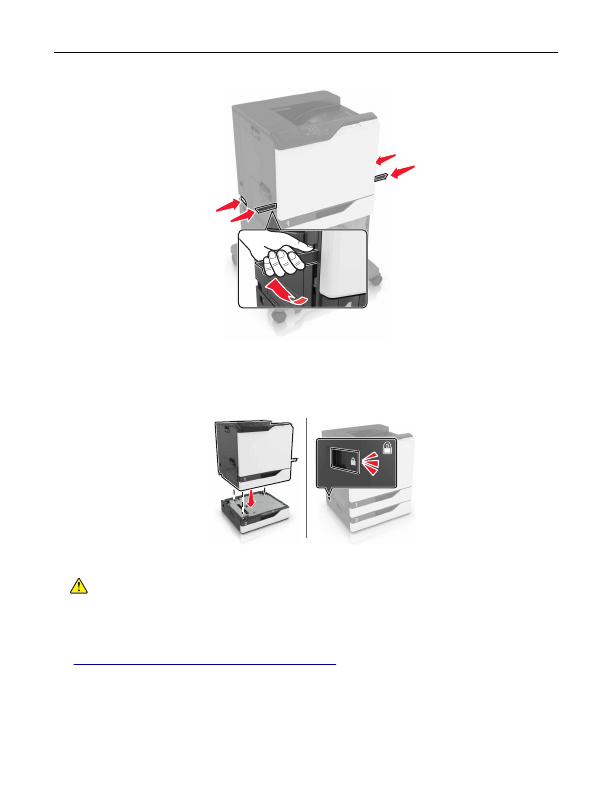
Note:
If optional trays are already installed, then unlock them from the printer before lifting the printer. Do
not try to lift the printer and trays at the same time.
5
Align the printer with the optional tray, and then lower the printer until it
clicks
into place.
6
Connect the power cord to the printer, and then to the electrical outlet.
CAUTION—POTENTIAL INJURY:
To avoid the risk of fire or electrical shock, connect the power cord
to an appropriately rated and properly grounded electrical outlet that is near the product and easily
accessible.
7
Turn on the printer.
If necessary, manually add the tray in the print driver to make it available for print jobs. For more information,
see
“Adding available options in the print driver” on page 133
.
When installing more than one hardware option, follow this order of installation.
•
Caster base
•
Optional 2200
‑
sheet tray
•
Optional 550
‑
sheet tray or envelope tray
Upgrading and migrating
130
Detailed Information for Lexmark C6160 Owners Manual
Related Documents for Lexmark C6160 Owners Manual
 All trademarks are property of their respective owners. Tightrope
Interactive
All trademarks are property of their respective owners. Tightrope
Interactive