
Search
Add Manual
My Manuals Drawer
Fresh Manuals
Brands
Lexmark
Printers
C6160
Ordering imaging units- Page 41
Lexmark C6160 Owners Manual
Owners Manual
Owners Manual
Owners Manual
Owners Manual
Owners Manual
Owners Manual
Owners Manual
Owners Manual
Owners Manual
Owners Manual
2014 Dodge Charger SRT Owner Manual
Save
Bookmark
Print
Table of Contents
Contents
Safety information
Conventions
Learning about the printer
Finding information about the printer
Selecting a location for the printer
Printer configurations
Attaching cables
Using the control panel
Understanding the status of the power button and indicator light
Using the home screen
Menu map
Printing a menu settings page
Setting up and using the home screen applications
Customizing the home screen
Using Display Customization
Setting up Forms and Favorites
Configuring Eco-Settings
Using Customer Support
Using QR Code Generator
Setting up Device Quotas
Using Google Drive
Managing contacts
Adding contacts
Adding groups
Editing contacts or groups
Deleting contacts or groups
Setting up and using the accessibility features
Enabling Magnification mode
Activating Voice Guidance
Adjusting the Voice Guidance speech rate
Enabling spoken passwords or personal identification numbers
Navigating the screen using gestures
Using the keyboard on the display
Loading paper and specialty media
Setting the size and type of the specialty media
Configuring Universal paper settings
Loading trays
Loading the multipurpose feeder
Linking trays
Printing
Printing from a computer
Printing forms
Printing from a mobile device
Printing from a mobile device using Lexmark Mobile Print
Printing from a mobile device using Google Cloud Print
Printing from a mobile device using Mopria Print Service
Printing from a mobile device using AirPrint
Printing from a flash drive
Supported flash drives and file types
Configuring confidential jobs
Printing held jobs
Printing a font sample list
Canceling a print job
Securing the printer
Locating the security slot
Erasing printer memory
Erasing printer hard disk memory
Configuring printer hard disk encryption
Restoring factory default settings
Statement of Volatility
Maintaining the printer
Adjusting the speaker volume
Adjusting the default internal speaker volume
Adjusting the default headphones volume
Configuring the fax speaker settings
Networking
Connecting the printer to a wireless network using Wi-Fi Protected Setup (WPS)
Changing port settings after installing an internal solutions port
Setting up serial printing (Windows only)
Cleaning the printer
Ordering parts and supplies
Checking the status of parts and supplies
Using genuine Lexmark parts and supplies
Ordering toner cartridges
Ordering a photoconductor unit
Ordering developer units
Ordering imaging units
Ordering staple cartridges
Ordering a waste toner bottle
Configuring supply notifications
Replacing parts and supplies
Replacing a developer unit
Replacing the fuser
Replacing a photoconductor unit
Replacing an imaging unit
Replacing a toner cartridge
Replacing the waste toner bottle
Replacing the transfer belt
Replacing the transfer roller
Replacing the pick roller
Replacing the separator bracket
Replacing the staple cartridge unit
Replacing the staple cartridge in the staple finisher
Replacing the staple cartridge holder in the staple finisher
Storing supplies
Moving the printer
Moving the printer to another location
Shipping the printer
Saving energy and paper
Setting up power saver modes
Adjusting the brightness of the printer display
Conserving supplies
Recycling
Recycling Lexmark products
Recycling Lexmark packaging
Returning Lexmark cartridges for reuse or recycling
Clearing jams
Avoiding jams
Identifying jam locations
Paper jam in trays
Paper jam in the multipurpose feeder
Paper jam in the standard bin
Paper jam in door B
Paper jam in the finisher bin
Staple jam in door G
Troubleshooting
Network connection problems
Cannot open Embedded Web Server
Unable to read flash drive
Enabling the USB port
Checking the printer connectivity
Hardware options problems
Cannot detect internal option
Internal solutions port does not operate correctly
Parallel or serial interface card does not operate correctly
Defective flash detected
Not enough free space in flash memory for resources
Unformatted flash detected
Issues with supplies
Replace cartridge, printer region mismatch
Non-Lexmark supply
Paper feed problems
Envelope seals when printing
Collated printing does not work
Paper curl
Tray linking does not work
Check tray connection
Paper frequently jams
Jammed pages are not reprinted
Printing problems
Confidential and other held documents do not print
Slow printing
Print jobs do not print
Print quality is poor
Blank or white pages
Dark print
Ghost images
Gray background
Horizontal dark lines
Horizontal white lines
Incorrect margins
Jagged or uneven characters
Light print
Mottled print and dots
Print crooked or skewed
Repeating defects
Solid color or black images
Text or images cut off
Toner easily rubs off
Uneven print density
Vertical dark lines or streaks
Vertical white lines
The printer is not responding
Job prints from the wrong tray or on the wrong paper
Color quality problems
Adjusting toner darkness
Modifying the colors in printed output
FAQ about color printing
The print appears tinted
Contacting customer support
Upgrading and migrating
Hardware
Available internal options
Installing a memory card
Installing an internal solutions port
Installing an optional card
Installing a printer hard disk
Installing optional trays
Installing the staple finisher
Software
Installing the printer software
Adding available options in the print driver
Firmware
Exporting or importing a configuration file
Updating firmware
Notices
Product information
Edition notice
GOVERNMENT END USERS
Trademarks
Licensing notices
Noise emission levels
Static sensitivity notice
Temperature information
Laser notice
Laser advisory label
Index
2
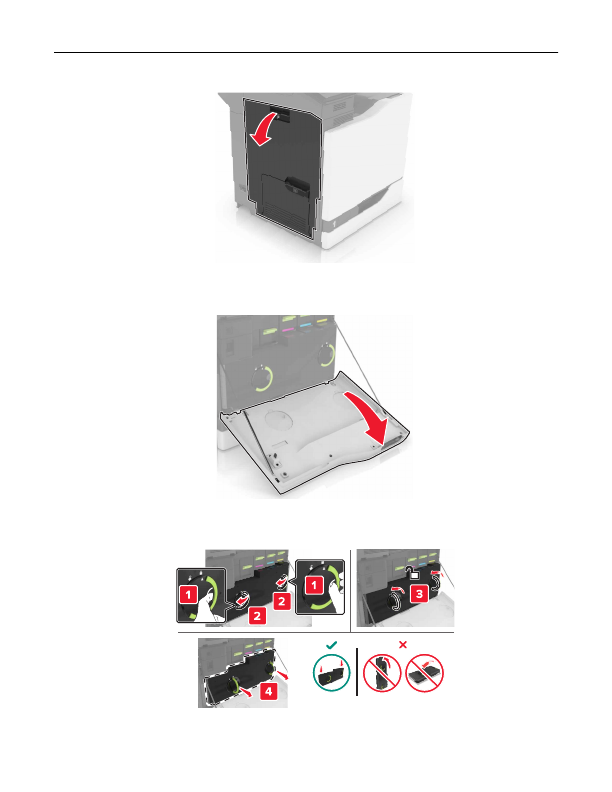
Open door A.
3
Remove the waste toner bottle.
Maintaining the printer
41
Prev
1
...
37
38
39
40
41
42
43
44
45
Next
Detailed Information for Lexmark C6160 Owners Manual
Related Documents for Lexmark C6160 Owners Manual
